Authorized Dealer
The Dual Link DVI to Mini DisplayPort Converter from Gefen works with all Mac and PC computers with a mini-DisplayPort. Using dual link DVI graphics, the Dual Link DVI-to-Mini-DisplayPort Converter supports resolutions…
Product highlights and buying context
The Dual Link DVI to Mini DisplayPort Converter from Gefen works with all Mac and PC computers with a mini-DisplayPort. Using dual link DVI graphics, the Dual Link DVI-to-Mini-DisplayPort Converter supports resolutions up to 2560x1600.
It's designed as a plug-and-play solution for viewing DVI video using the Mini DisplayPort interface with audio support. The Dual Link DVI to Mini DisplayPort Converter can also be used with displays using standard DisplayPort connections with a passive Mini DisplayPort to DisplayPort cable.
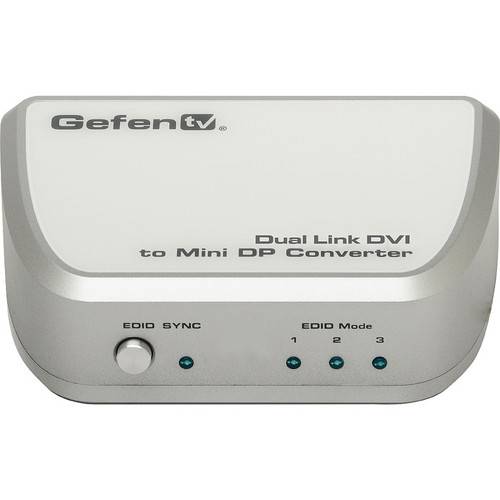
Audio support is provided through the built-in 3.5mm audio jack. The audio output is fed through the Mini DisplayPort connector on the unit. An EDID switch button is provided for manually selecting the three EDID modes: 2560x1600, 2560x1440, or pass-through. The unit is powered using the included USB cable.
The Dual Link DVI to Mini DisplayPort Converter comes equipped with advanced EDID management features, such as the EDID switch located on the front panel. It can be used to switch seamlessly between three different modes: 2560x1600, 2560x1440, or pass-through
Audio input is handled by a 3.5mm (1/8") audio jack. Both the DVI video signal and the audio signal are converted by the Dual Link DVI to Mini DisplayPort Converter and relayed through the Mini DisplayPort. Since the Mini DisplayPort handles both video and audio signals (just like its HDMI counterpart), there's no need for a separate audio connector from the converter to the display receiving the signal
The Dual Link DVI to Mini DisplayPort Converter supports resolutions up to 2560x1600. Also, the included EDID button can switch to 2560x1440, which is the native resolution of Apple 27" iMacs and Apple 27" Cinema Displays
The Dual Link DVI to Mini DisplayPort Converter is powered through a USB cable so it doesn't take up extra space on the electrical outlet
Additional Details
Loading…
